%20--%3e%3cdefs%3e%3cstyle%3e%20.st0%20{%20fill:%20%23b1d15b;%20}%20.st1%20{%20fill:%20%23f3f1eb;%20}%20%3c/style%3e%3c/defs%3e%3cpath%20class='st0'%20d='M223.1,0l-32.7,53.9c-4.1,6.7-11.5,11-19.5,11h-90.1c-8,0-15.6-4.3-19.7-11L28.6,0H0v251.5h28.6l32.5-53.5c4.1-6.9,11.7-11,19.7-11h90.1c8,0,15.4,4.1,19.5,11l32.7,53.5h28.4V0h-28.4ZM156.2,156.4h-60.9v-60.9h60.9v60.9Z'/%3e%3cg%3e%3cpath%20class='st1'%20d='M337.8,64.9h17.5v52.9h61.4v-52.9h17.3v122.2h-17.3v-54.6h-61.4v54.6h-17.5v-122.2Z'/%3e%3cpath%20class='st1'%20d='M498.7,188.3c-8.3,0-15.7-1.8-22.3-5.5-6.6-3.7-11.7-8.8-15.4-15.5-3.7-6.7-5.6-14.6-5.6-23.7s1.9-17.2,5.8-23.9c3.9-6.7,9.1-12,15.7-15.6,6.6-3.7,14.1-5.5,22.3-5.5s15.7,1.8,22.4,5.5,12,8.8,15.8,15.5c3.9,6.7,5.8,14.6,5.8,23.6s-1.9,17.2-5.8,23.9c-3.9,6.8-9.2,12-16,15.6-6.7,3.7-14.3,5.5-22.7,5.5ZM498.5,173.3c4.7,0,9-1.1,13.1-3.2,4.1-2.1,7.4-5.4,10-9.9,2.6-4.4,3.9-10.1,3.9-16.9s-1.3-12.3-3.8-16.7c-2.5-4.4-5.8-7.6-9.8-9.8-4.1-2.1-8.4-3.2-13.1-3.2s-8.8,1.1-12.6,3.2c-3.9,2.2-7.1,5.4-9.5,9.9-2.4,4.4-3.7,10.1-3.7,16.9s1.2,12.3,3.6,16.7c2.4,4.4,5.5,7.6,9.3,9.8,3.9,2.2,8,3.2,12.6,3.2Z'/%3e%3cpath%20class='st1'%20d='M565.9,99.8v-24.4h16.6v24.4h21.8v14.7h-21.8v42.9c0,5.3,1.1,9.1,3.2,11.3s4.9,3.5,8.2,3.8,6.8.2,10.4-.3v14.1c-4.8,1.1-9.5,1.4-14.1,1-4.6-.4-8.7-1.7-12.4-3.9-3.7-2.2-6.6-5.4-8.7-9.7s-3.2-9.7-3.2-16.3v-42.9h-12.6v-14.7h12.6Z'/%3e%3cpath%20class='st1'%20d='M660.5,188.3c-8.4,0-15.8-2-22.3-5.9s-11.5-9.3-15.2-16.1c-3.7-6.9-5.5-14.7-5.5-23.5s1.8-16.1,5.4-22.7c3.6-6.6,8.6-11.9,14.9-15.7,6.3-3.8,13.5-5.8,21.6-5.8s15.4,1.8,21.6,5.3c6.3,3.5,11.2,8.5,14.7,14.8,3.5,6.3,5.2,13.6,5.1,21.9,0,1.4,0,2.8-.2,4.3-.1,1.5-.3,3.1-.5,4.8h-64.6c.4,4.7,1.6,8.8,3.9,12.3,2.3,3.5,5.2,6.3,8.7,8.3,3.6,2,7.6,3,12.1,3s10.9-1.1,15.2-3.4c4.3-2.3,7.3-5.3,9.1-9.2l14.3,5.1c-3.5,7.1-8.6,12.6-15.3,16.6s-14.4,5.9-23.1,5.9ZM682.8,135.6c0-4.2-1-8-3.1-11.4-2.1-3.4-4.9-6-8.5-7.9-3.6-1.9-7.5-2.9-11.9-2.9s-7.6,1-10.9,2.9c-3.3,1.9-6.1,4.5-8.4,7.9-2.3,3.3-3.7,7.1-4.3,11.4h47.1Z'/%3e%3cpath%20class='st1'%20d='M720.9,61.4h16.4v125.7h-16.4V61.4Z'/%3e%3cpath%20class='st1'%20d='M818.3,188.3c-8.6,0-16.7-1.5-24.2-4.5-7.5-3-14-7.3-19.6-12.8-5.6-5.5-10-12.1-13.1-19.7-3.1-7.6-4.7-16-4.7-25.2s1.6-17.4,4.7-25c3.2-7.6,7.5-14.2,13.1-19.8,5.6-5.6,12.1-9.9,19.6-12.9,7.5-3,15.6-4.5,24.2-4.5s16.5,1.5,23.9,4.5c7.4,3,14,7.3,19.5,12.9,5.6,5.6,10,12.2,13.1,19.8,3.1,7.6,4.7,16,4.7,25s-1.6,17.6-4.7,25.2c-3.2,7.6-7.5,14.2-13.1,19.7-5.6,5.5-12.1,9.8-19.5,12.8-7.4,3-15.4,4.5-23.9,4.5ZM818.3,173.3c8.3,0,15.7-1.9,22.3-5.8,6.6-3.8,11.8-9.3,15.6-16.4,3.9-7.1,5.8-15.5,5.8-25.1s-1.9-18.2-5.8-25.2c-3.8-7-9.1-12.5-15.6-16.3-6.6-3.8-14-5.8-22.3-5.8s-15.9,1.9-22.5,5.8c-6.6,3.8-11.9,9.3-15.6,16.3-3.8,7-5.7,15.4-5.7,25.2s1.9,18,5.8,25.1c3.8,7.1,9.1,12.6,15.6,16.4,6.6,3.8,14,5.8,22.4,5.8Z'/%3e%3cpath%20class='st1'%20d='M910.6,154.8c.7,3.3,2.1,6.3,4.3,9.1,2.2,2.8,5.1,5.1,8.8,6.8,3.7,1.8,8.3,2.6,13.8,2.6,8.1,0,14.2-1.9,18.1-5.7,3.9-3.8,5.8-8.2,5.8-13.3s-1.2-7.7-3.6-10.4c-2.4-2.7-5.7-5.1-9.8-7-4.1-1.9-8.9-3.6-14.2-5.1-4.7-1.4-9.2-2.9-13.7-4.5-4.5-1.6-8.5-3.5-12.1-5.9-3.6-2.4-6.5-5.5-8.6-9.2-2.1-3.8-3.1-8.5-3.1-14.2s1.7-13.2,5.1-18.3c3.4-5.1,8.1-9,14.2-11.8,6.1-2.7,13.2-4.1,21.2-4.1s12.8,1,18.2,2.9c5.3,1.9,9.9,4.6,13.5,8.2,3.7,3.6,6.4,7.8,8.1,12.8l-15.9,5.8c-.7-2.6-2.2-5-4.4-7.3-2.2-2.3-5-4.1-8.4-5.5-3.4-1.4-7.2-2.1-11.4-2.1-4.3-.1-8.2.6-11.6,2-3.4,1.5-6.2,3.5-8.2,6.2-2,2.7-3.1,5.9-3.1,9.6s1.2,7.3,3.5,9.6c2.3,2.3,5.4,4.2,9.3,5.8,3.9,1.5,8.2,3,12.8,4.4,4.9,1.5,9.7,3.1,14.3,4.9,4.6,1.8,8.9,4,12.7,6.6,3.8,2.7,6.8,6,9.1,10,2.3,4,3.5,9.1,3.5,15.1s-1.5,12.5-4.6,17.8c-3,5.4-7.6,9.7-13.7,12.9-6.1,3.3-13.8,4.9-23,4.9s-14.4-1.2-20.4-3.5c-6-2.3-11-5.6-14.9-9.7-3.9-4.1-6.5-8.9-7.8-14.4l15.9-5.9Z'/%3e%3c/g%3e%3c/svg%3e)
Front desk, housekeeping & operations
Flowservice in motion.
The front desk, housekeeping and operations board for the whole house: arrivals grouped by boat and car time, rooms moving from dirty to ready, and a folio that already includes dinner.
'%3e%3cpath%20d='M13.74%2020.4286C13.74%2015.8586%2016.27%2011.8886%2020%209.81858C18.26%208.85858%2016.26%208.29858%2014.13%208.29858C7.43%208.29858%202%2013.7286%202%2020.4286C2%2027.1286%207.43%2032.5586%2014.13%2032.5586C16.26%2032.5586%2018.26%2032.0086%2020%2031.0386C16.27%2028.9686%2013.74%2024.9986%2013.74%2020.4286Z'%20fill='%238BB3F3'/%3e%3cpath%20d='M25.87%208.29858C23.74%208.29858%2021.74%208.84858%2020%209.81858C23.73%2011.8886%2026.26%2015.8586%2026.26%2020.4286C26.26%2024.9986%2023.73%2028.9686%2020%2031.0386C21.74%2031.9986%2023.74%2032.5586%2025.87%2032.5586C32.57%2032.5586%2038%2027.1286%2038%2020.4286C38%2013.7286%2032.57%208.29858%2025.87%208.29858Z'%20fill='%238BB3F3'/%3e%3cpath%20d='M26.2602%2020.4286C26.2602%2015.8586%2023.7302%2011.8886%2020.0002%209.8186C16.2702%2011.8886%2013.7402%2015.8586%2013.7402%2020.4286C13.7402%2024.9986%2016.2702%2028.9686%2020.0002%2031.0386C23.7302%2028.9686%2026.2602%2024.9986%2026.2602%2020.4286Z'%20fill='%234B7CE1'/%3e%3c/g%3e%3cdefs%3e%3cclipPath%20id='clip0_2003_1123'%3e%3crect%20width='36'%20height='24.26'%20fill='white'%20transform='translate(2%208.29858)'/%3e%3c/clipPath%3e%3c/defs%3e%3c/svg%3e)
Flow reads the same stays as Desk and the same kitchen charges as Calm Kitchen. The front desk sees who is arriving, when, and what is still blocking them; housekeeping works from one board; the duty manager gets a written shift brief instead of a stand-up scramble.
What it does
Built around how
the work actually moves.
A front desk that already knows
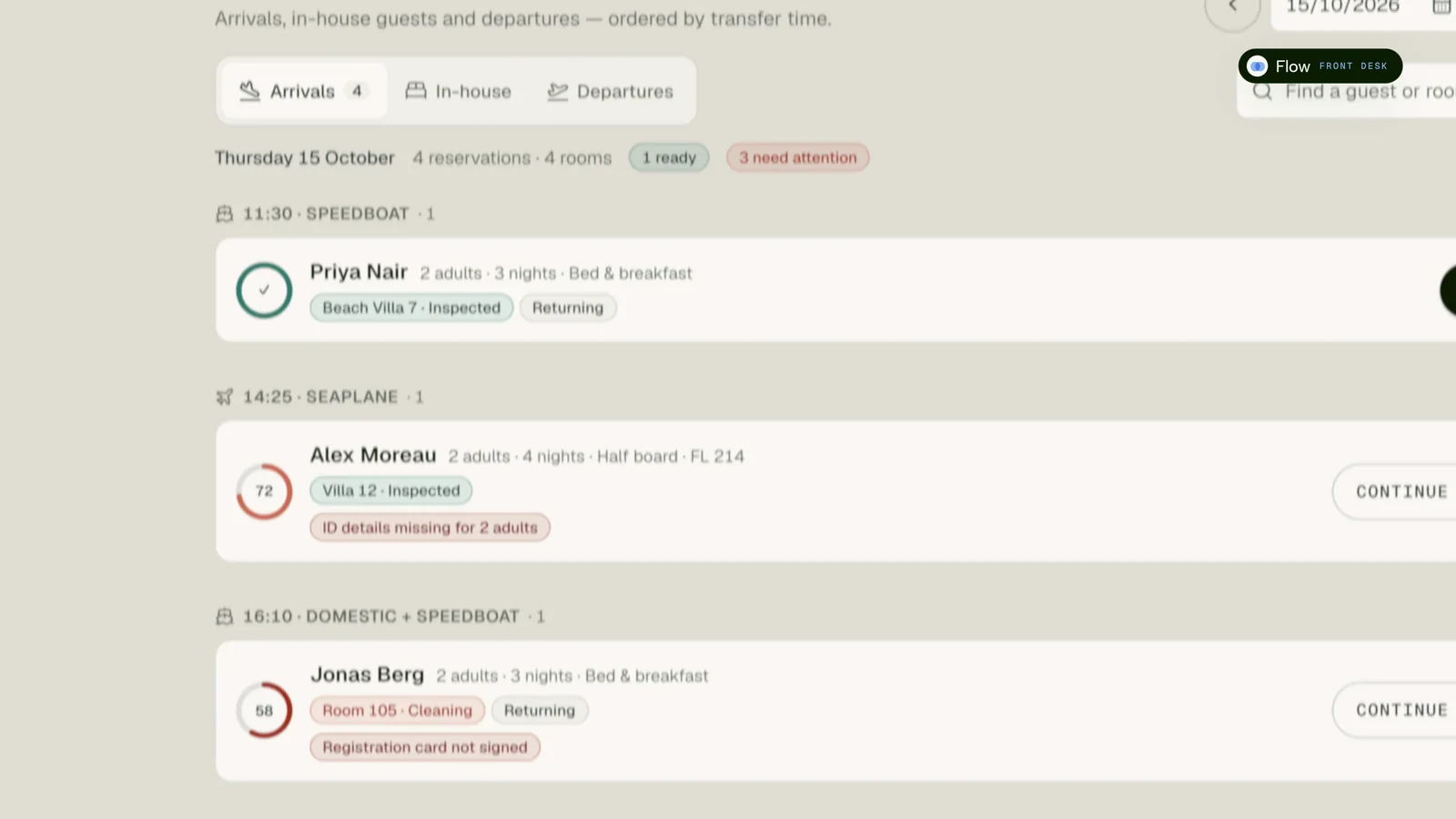
Arrivals, in-house guests and departures for any date, grouped by transfer time (speedboat, seaplane, car), each with a readiness ring and plain-language blockers such as “ID details missing for 2 adults”. Details saved in Desk and the PMS are already there.
- Arrivals grouped by boat and car time
- Readiness at a glance, blockers in plain language
- Check-in that pre-fills from PMS, Desk and staff, where switched on
- Every pre-filled field shows where it came from
One bill at checkout
The stay's folio shows the room account from your PMS and the Calm Kitchen dining ledger side by side, with one balance due. A dinner already posted to the room is marked as such and never counted twice.
- Room folio and dining ledger in one balance
- Charges already on the room folio shown, not double-counted
- Unmatched dining checks flagged for a person to review
- Checkout sets the room to dirty and creates the cleaning task
The floor, on one board
Housekeeping moves rooms from start to clean, inspected and ready, and flags maintenance from the same screen, in English, Spanish or Indonesian. Supervisors see the whole grid; front desk sees what is ready.
- Start → Mark clean → Inspect → Ready
- Maintenance flagged as a task with the room attached
- Supervisor grid and front-desk readiness from the same data
- Operations tasks and cases in one list
The day, handled
A dashboard that ranks what needs attention now, a written shift brief and handover, reviews with a draft reply to approve, and Nexus on every page for questions like “Which arrivals still need a room ready?”.
- Ops radar and shift brief from live operations
- Handover notes that carry to the next shift
- Review replies drafted, approved and marked responded
- An autonomy setting that keeps guest-facing actions confirmed
In the suite
Flow as it runs today.
A faithful recreation of the screen your team opens, shown with fictional data. Same context, same data and the same Nexus as every other surface.
How it works
From first signal
to a settled outcome.
Every Flow workflow starts from something real in the property, and every step keeps a person in charge of what reaches a guest, the books or the PMS.
- 01
Know
Arrivals are grouped by transfer time with what is ready and what is missing, from the same record Desk updates.
- 02
Prepare
Housekeeping moves rooms to ready; the front desk sees it without a radio call.
- 03
Serve
Maintenance and service issues become tasks; Nexus answers questions and asks before it changes anything.
- 04
Settle
Room and dining meet on one folio at checkout, and the room goes back to housekeeping as a task.
Scope agreed in writing
Know what you are signing up for.
Confirm features, integration scope and support in your order form before relying on them for operations.
Subject to assessment
Plan your
connected workflows.
Availability is confirmed in writing for your property. Provider permissions, technical validation and any required approvals must be in place before activation. A request does not guarantee delivery.
- Property management
- Messaging
What changes
The same property,
on a calmer shift.
Calmer mornings
The shift starts with a written board and brief: front office, housekeeping and duty manager on the same plan.
No re-typing at arrival
What reservations already know about a guest is on the front desk screen when they walk in.
No checkout arguments
Restaurant and room charges on one folio, with double counting ruled out.
Bring Flow into the operating layer
Run the house as one moving plan.
Stop running arrivals from a printout, housekeeping from a group chat and checkout from two systems. Bring them onto one board that everyone reads.