%20--%3e%3cdefs%3e%3cstyle%3e%20.st0%20{%20fill:%20%23b1d15b;%20}%20.st1%20{%20fill:%20%23f3f1eb;%20}%20%3c/style%3e%3c/defs%3e%3cpath%20class='st0'%20d='M223.1,0l-32.7,53.9c-4.1,6.7-11.5,11-19.5,11h-90.1c-8,0-15.6-4.3-19.7-11L28.6,0H0v251.5h28.6l32.5-53.5c4.1-6.9,11.7-11,19.7-11h90.1c8,0,15.4,4.1,19.5,11l32.7,53.5h28.4V0h-28.4ZM156.2,156.4h-60.9v-60.9h60.9v60.9Z'/%3e%3cg%3e%3cpath%20class='st1'%20d='M337.8,64.9h17.5v52.9h61.4v-52.9h17.3v122.2h-17.3v-54.6h-61.4v54.6h-17.5v-122.2Z'/%3e%3cpath%20class='st1'%20d='M498.7,188.3c-8.3,0-15.7-1.8-22.3-5.5-6.6-3.7-11.7-8.8-15.4-15.5-3.7-6.7-5.6-14.6-5.6-23.7s1.9-17.2,5.8-23.9c3.9-6.7,9.1-12,15.7-15.6,6.6-3.7,14.1-5.5,22.3-5.5s15.7,1.8,22.4,5.5,12,8.8,15.8,15.5c3.9,6.7,5.8,14.6,5.8,23.6s-1.9,17.2-5.8,23.9c-3.9,6.8-9.2,12-16,15.6-6.7,3.7-14.3,5.5-22.7,5.5ZM498.5,173.3c4.7,0,9-1.1,13.1-3.2,4.1-2.1,7.4-5.4,10-9.9,2.6-4.4,3.9-10.1,3.9-16.9s-1.3-12.3-3.8-16.7c-2.5-4.4-5.8-7.6-9.8-9.8-4.1-2.1-8.4-3.2-13.1-3.2s-8.8,1.1-12.6,3.2c-3.9,2.2-7.1,5.4-9.5,9.9-2.4,4.4-3.7,10.1-3.7,16.9s1.2,12.3,3.6,16.7c2.4,4.4,5.5,7.6,9.3,9.8,3.9,2.2,8,3.2,12.6,3.2Z'/%3e%3cpath%20class='st1'%20d='M565.9,99.8v-24.4h16.6v24.4h21.8v14.7h-21.8v42.9c0,5.3,1.1,9.1,3.2,11.3s4.9,3.5,8.2,3.8,6.8.2,10.4-.3v14.1c-4.8,1.1-9.5,1.4-14.1,1-4.6-.4-8.7-1.7-12.4-3.9-3.7-2.2-6.6-5.4-8.7-9.7s-3.2-9.7-3.2-16.3v-42.9h-12.6v-14.7h12.6Z'/%3e%3cpath%20class='st1'%20d='M660.5,188.3c-8.4,0-15.8-2-22.3-5.9s-11.5-9.3-15.2-16.1c-3.7-6.9-5.5-14.7-5.5-23.5s1.8-16.1,5.4-22.7c3.6-6.6,8.6-11.9,14.9-15.7,6.3-3.8,13.5-5.8,21.6-5.8s15.4,1.8,21.6,5.3c6.3,3.5,11.2,8.5,14.7,14.8,3.5,6.3,5.2,13.6,5.1,21.9,0,1.4,0,2.8-.2,4.3-.1,1.5-.3,3.1-.5,4.8h-64.6c.4,4.7,1.6,8.8,3.9,12.3,2.3,3.5,5.2,6.3,8.7,8.3,3.6,2,7.6,3,12.1,3s10.9-1.1,15.2-3.4c4.3-2.3,7.3-5.3,9.1-9.2l14.3,5.1c-3.5,7.1-8.6,12.6-15.3,16.6s-14.4,5.9-23.1,5.9ZM682.8,135.6c0-4.2-1-8-3.1-11.4-2.1-3.4-4.9-6-8.5-7.9-3.6-1.9-7.5-2.9-11.9-2.9s-7.6,1-10.9,2.9c-3.3,1.9-6.1,4.5-8.4,7.9-2.3,3.3-3.7,7.1-4.3,11.4h47.1Z'/%3e%3cpath%20class='st1'%20d='M720.9,61.4h16.4v125.7h-16.4V61.4Z'/%3e%3cpath%20class='st1'%20d='M818.3,188.3c-8.6,0-16.7-1.5-24.2-4.5-7.5-3-14-7.3-19.6-12.8-5.6-5.5-10-12.1-13.1-19.7-3.1-7.6-4.7-16-4.7-25.2s1.6-17.4,4.7-25c3.2-7.6,7.5-14.2,13.1-19.8,5.6-5.6,12.1-9.9,19.6-12.9,7.5-3,15.6-4.5,24.2-4.5s16.5,1.5,23.9,4.5c7.4,3,14,7.3,19.5,12.9,5.6,5.6,10,12.2,13.1,19.8,3.1,7.6,4.7,16,4.7,25s-1.6,17.6-4.7,25.2c-3.2,7.6-7.5,14.2-13.1,19.7-5.6,5.5-12.1,9.8-19.5,12.8-7.4,3-15.4,4.5-23.9,4.5ZM818.3,173.3c8.3,0,15.7-1.9,22.3-5.8,6.6-3.8,11.8-9.3,15.6-16.4,3.9-7.1,5.8-15.5,5.8-25.1s-1.9-18.2-5.8-25.2c-3.8-7-9.1-12.5-15.6-16.3-6.6-3.8-14-5.8-22.3-5.8s-15.9,1.9-22.5,5.8c-6.6,3.8-11.9,9.3-15.6,16.3-3.8,7-5.7,15.4-5.7,25.2s1.9,18,5.8,25.1c3.8,7.1,9.1,12.6,15.6,16.4,6.6,3.8,14,5.8,22.4,5.8Z'/%3e%3cpath%20class='st1'%20d='M910.6,154.8c.7,3.3,2.1,6.3,4.3,9.1,2.2,2.8,5.1,5.1,8.8,6.8,3.7,1.8,8.3,2.6,13.8,2.6,8.1,0,14.2-1.9,18.1-5.7,3.9-3.8,5.8-8.2,5.8-13.3s-1.2-7.7-3.6-10.4c-2.4-2.7-5.7-5.1-9.8-7-4.1-1.9-8.9-3.6-14.2-5.1-4.7-1.4-9.2-2.9-13.7-4.5-4.5-1.6-8.5-3.5-12.1-5.9-3.6-2.4-6.5-5.5-8.6-9.2-2.1-3.8-3.1-8.5-3.1-14.2s1.7-13.2,5.1-18.3c3.4-5.1,8.1-9,14.2-11.8,6.1-2.7,13.2-4.1,21.2-4.1s12.8,1,18.2,2.9c5.3,1.9,9.9,4.6,13.5,8.2,3.7,3.6,6.4,7.8,8.1,12.8l-15.9,5.8c-.7-2.6-2.2-5-4.4-7.3-2.2-2.3-5-4.1-8.4-5.5-3.4-1.4-7.2-2.1-11.4-2.1-4.3-.1-8.2.6-11.6,2-3.4,1.5-6.2,3.5-8.2,6.2-2,2.7-3.1,5.9-3.1,9.6s1.2,7.3,3.5,9.6c2.3,2.3,5.4,4.2,9.3,5.8,3.9,1.5,8.2,3,12.8,4.4,4.9,1.5,9.7,3.1,14.3,4.9,4.6,1.8,8.9,4,12.7,6.6,3.8,2.7,6.8,6,9.1,10,2.3,4,3.5,9.1,3.5,15.1s-1.5,12.5-4.6,17.8c-3,5.4-7.6,9.7-13.7,12.9-6.1,3.3-13.8,4.9-23,4.9s-14.4-1.2-20.4-3.5c-6-2.3-11-5.6-14.9-9.7-3.9-4.1-6.5-8.9-7.8-14.4l15.9-5.9Z'/%3e%3c/g%3e%3c/svg%3e)
Owners, GMs & governance
Commandone queue for the calls that matter.
Decisions from every app in one place, owner-level approvals, an assistant that works across the whole suite, and owner updates that draft themselves.

Command is where the GM and the owner start the day: what needs attention, what the apps and Nexus are proposing, and who needs to sign off. It is also where the group manages its properties, people, AI agents and connections.
What it does
Built around how
the work actually moves.
One queue for every decision
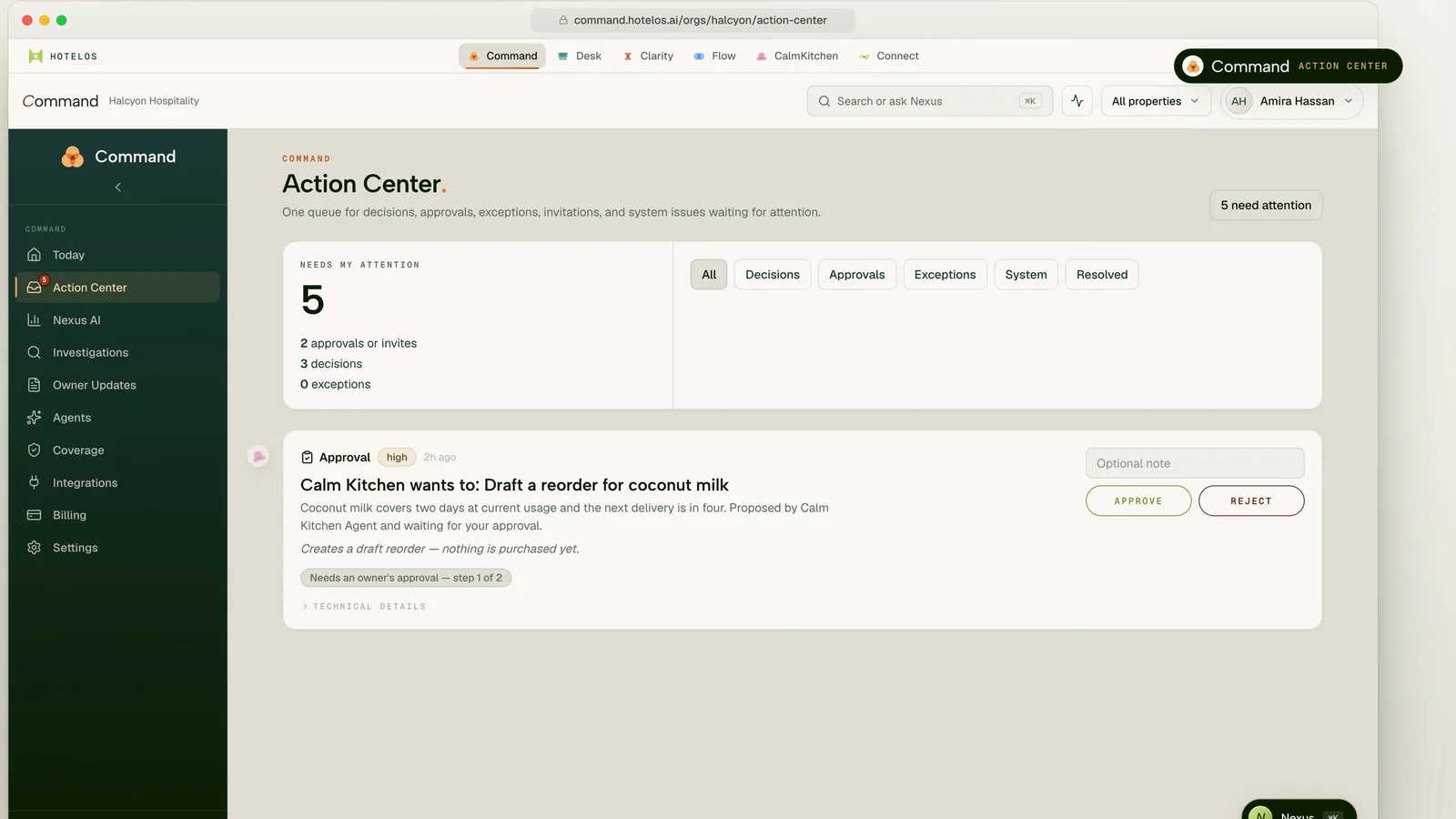
The Action Center collects decisions, approvals and exceptions from Desk, Flow and Calm Kitchen. High-risk items need an owner's approval, and nobody can approve a request they proposed themselves.
- Decisions, approvals, exceptions and resolved items in one place
- Multi-step approval chains with maker-checker
- Owner approval for high-risk actions
- “Why this recommendation” on suggestions
Today, across the property or the group
Command's Today page shows what needs attention, arrivals, departures, in-house guests, occupancy and revenue this month, with a 14-day look ahead.
- “N things need attention today”, ranked
- Executive summary and operating snapshot
- A 14-day look ahead
- All properties or one, with the same view
Nexus across the whole suite
Ask where occupancy will be softest in the next 30 days, which arrivals need attention, or how yesterday went across every property. Metric answers show how they were verified. Recommended moves can be added to your plan.
- Cross-app answers with charts and metric cards
- “How this was verified” on metric answers
- Recommended moves you add to a plan, or dismiss
- Recurring reports set up from chat, confirmed by you
Owner updates, agents and access
Owner updates start as a first draft built from occupancy, revenue and payroll figures that you edit and send. AI agents can be switched on or paused one by one. One sign-in covers every app, with MFA and passkeys.
- Owner updates drafted from the figures, sent by you
- AI agents you activate, pause and scope by role
- One sign-in for the suite, with MFA and passkeys
- Audit log export for Command's own actions
In the suite
Command as it runs today.
A faithful recreation of the screen your team opens, shown with fictional data. Same context, same data and the same Nexus as every other surface.
How it works
From first signal
to a settled outcome.
Every Command workflow starts from something real in the property, and every step keeps a person in charge of what reaches a guest, the books or the PMS.
- 01
Surface
Apps and Nexus raise decisions and exceptions into one Action Center.
- 02
Explain
Each item says what is proposed, why, and what happens if you approve it.
- 03
Approve
The right person approves, with owner sign-off where the risk is high. Nobody approves their own request.
- 04
Record
The decision, the approver and the note stay on record, and resolved items show what they were worth.
Scope agreed in writing
Know what you are signing up for.
Confirm features, integration scope and support in your order form before relying on them for operations.
Subject to assessment
Plan your
connected workflows.
Availability is confirmed in writing for your property. Provider permissions, technical validation and any required approvals must be in place before activation. A request does not guarantee delivery.
- Property management
- Accounting & finance
- Guest inbox
What changes
The same property,
on a calmer shift.
No more approvals by chat
Reorders, operational decisions and exceptions arrive in one queue with the context attached, not in a thread you have to scroll.
One assistant, every app
The same Nexus and the same history, whether you ask from Command, Desk, Flow, Clarity, Calm Kitchen or HotelOS Go.
Owner updates in minutes
A first draft from the actual figures, in your voice, ready to edit and send.
Bring Command into the operating layer
Govern the property without chasing anyone.
Let the apps and Nexus prepare the work, and keep the decisions where they belong: with the GM and the owner, in one place, on record.