%20--%3e%3cdefs%3e%3cstyle%3e%20.st0%20{%20fill:%20%23b1d15b;%20}%20.st1%20{%20fill:%20%23f3f1eb;%20}%20%3c/style%3e%3c/defs%3e%3cpath%20class='st0'%20d='M223.1,0l-32.7,53.9c-4.1,6.7-11.5,11-19.5,11h-90.1c-8,0-15.6-4.3-19.7-11L28.6,0H0v251.5h28.6l32.5-53.5c4.1-6.9,11.7-11,19.7-11h90.1c8,0,15.4,4.1,19.5,11l32.7,53.5h28.4V0h-28.4ZM156.2,156.4h-60.9v-60.9h60.9v60.9Z'/%3e%3cg%3e%3cpath%20class='st1'%20d='M337.8,64.9h17.5v52.9h61.4v-52.9h17.3v122.2h-17.3v-54.6h-61.4v54.6h-17.5v-122.2Z'/%3e%3cpath%20class='st1'%20d='M498.7,188.3c-8.3,0-15.7-1.8-22.3-5.5-6.6-3.7-11.7-8.8-15.4-15.5-3.7-6.7-5.6-14.6-5.6-23.7s1.9-17.2,5.8-23.9c3.9-6.7,9.1-12,15.7-15.6,6.6-3.7,14.1-5.5,22.3-5.5s15.7,1.8,22.4,5.5,12,8.8,15.8,15.5c3.9,6.7,5.8,14.6,5.8,23.6s-1.9,17.2-5.8,23.9c-3.9,6.8-9.2,12-16,15.6-6.7,3.7-14.3,5.5-22.7,5.5ZM498.5,173.3c4.7,0,9-1.1,13.1-3.2,4.1-2.1,7.4-5.4,10-9.9,2.6-4.4,3.9-10.1,3.9-16.9s-1.3-12.3-3.8-16.7c-2.5-4.4-5.8-7.6-9.8-9.8-4.1-2.1-8.4-3.2-13.1-3.2s-8.8,1.1-12.6,3.2c-3.9,2.2-7.1,5.4-9.5,9.9-2.4,4.4-3.7,10.1-3.7,16.9s1.2,12.3,3.6,16.7c2.4,4.4,5.5,7.6,9.3,9.8,3.9,2.2,8,3.2,12.6,3.2Z'/%3e%3cpath%20class='st1'%20d='M565.9,99.8v-24.4h16.6v24.4h21.8v14.7h-21.8v42.9c0,5.3,1.1,9.1,3.2,11.3s4.9,3.5,8.2,3.8,6.8.2,10.4-.3v14.1c-4.8,1.1-9.5,1.4-14.1,1-4.6-.4-8.7-1.7-12.4-3.9-3.7-2.2-6.6-5.4-8.7-9.7s-3.2-9.7-3.2-16.3v-42.9h-12.6v-14.7h12.6Z'/%3e%3cpath%20class='st1'%20d='M660.5,188.3c-8.4,0-15.8-2-22.3-5.9s-11.5-9.3-15.2-16.1c-3.7-6.9-5.5-14.7-5.5-23.5s1.8-16.1,5.4-22.7c3.6-6.6,8.6-11.9,14.9-15.7,6.3-3.8,13.5-5.8,21.6-5.8s15.4,1.8,21.6,5.3c6.3,3.5,11.2,8.5,14.7,14.8,3.5,6.3,5.2,13.6,5.1,21.9,0,1.4,0,2.8-.2,4.3-.1,1.5-.3,3.1-.5,4.8h-64.6c.4,4.7,1.6,8.8,3.9,12.3,2.3,3.5,5.2,6.3,8.7,8.3,3.6,2,7.6,3,12.1,3s10.9-1.1,15.2-3.4c4.3-2.3,7.3-5.3,9.1-9.2l14.3,5.1c-3.5,7.1-8.6,12.6-15.3,16.6s-14.4,5.9-23.1,5.9ZM682.8,135.6c0-4.2-1-8-3.1-11.4-2.1-3.4-4.9-6-8.5-7.9-3.6-1.9-7.5-2.9-11.9-2.9s-7.6,1-10.9,2.9c-3.3,1.9-6.1,4.5-8.4,7.9-2.3,3.3-3.7,7.1-4.3,11.4h47.1Z'/%3e%3cpath%20class='st1'%20d='M720.9,61.4h16.4v125.7h-16.4V61.4Z'/%3e%3cpath%20class='st1'%20d='M818.3,188.3c-8.6,0-16.7-1.5-24.2-4.5-7.5-3-14-7.3-19.6-12.8-5.6-5.5-10-12.1-13.1-19.7-3.1-7.6-4.7-16-4.7-25.2s1.6-17.4,4.7-25c3.2-7.6,7.5-14.2,13.1-19.8,5.6-5.6,12.1-9.9,19.6-12.9,7.5-3,15.6-4.5,24.2-4.5s16.5,1.5,23.9,4.5c7.4,3,14,7.3,19.5,12.9,5.6,5.6,10,12.2,13.1,19.8,3.1,7.6,4.7,16,4.7,25s-1.6,17.6-4.7,25.2c-3.2,7.6-7.5,14.2-13.1,19.7-5.6,5.5-12.1,9.8-19.5,12.8-7.4,3-15.4,4.5-23.9,4.5ZM818.3,173.3c8.3,0,15.7-1.9,22.3-5.8,6.6-3.8,11.8-9.3,15.6-16.4,3.9-7.1,5.8-15.5,5.8-25.1s-1.9-18.2-5.8-25.2c-3.8-7-9.1-12.5-15.6-16.3-6.6-3.8-14-5.8-22.3-5.8s-15.9,1.9-22.5,5.8c-6.6,3.8-11.9,9.3-15.6,16.3-3.8,7-5.7,15.4-5.7,25.2s1.9,18,5.8,25.1c3.8,7.1,9.1,12.6,15.6,16.4,6.6,3.8,14,5.8,22.4,5.8Z'/%3e%3cpath%20class='st1'%20d='M910.6,154.8c.7,3.3,2.1,6.3,4.3,9.1,2.2,2.8,5.1,5.1,8.8,6.8,3.7,1.8,8.3,2.6,13.8,2.6,8.1,0,14.2-1.9,18.1-5.7,3.9-3.8,5.8-8.2,5.8-13.3s-1.2-7.7-3.6-10.4c-2.4-2.7-5.7-5.1-9.8-7-4.1-1.9-8.9-3.6-14.2-5.1-4.7-1.4-9.2-2.9-13.7-4.5-4.5-1.6-8.5-3.5-12.1-5.9-3.6-2.4-6.5-5.5-8.6-9.2-2.1-3.8-3.1-8.5-3.1-14.2s1.7-13.2,5.1-18.3c3.4-5.1,8.1-9,14.2-11.8,6.1-2.7,13.2-4.1,21.2-4.1s12.8,1,18.2,2.9c5.3,1.9,9.9,4.6,13.5,8.2,3.7,3.6,6.4,7.8,8.1,12.8l-15.9,5.8c-.7-2.6-2.2-5-4.4-7.3-2.2-2.3-5-4.1-8.4-5.5-3.4-1.4-7.2-2.1-11.4-2.1-4.3-.1-8.2.6-11.6,2-3.4,1.5-6.2,3.5-8.2,6.2-2,2.7-3.1,5.9-3.1,9.6s1.2,7.3,3.5,9.6c2.3,2.3,5.4,4.2,9.3,5.8,3.9,1.5,8.2,3,12.8,4.4,4.9,1.5,9.7,3.1,14.3,4.9,4.6,1.8,8.9,4,12.7,6.6,3.8,2.7,6.8,6,9.1,10,2.3,4,3.5,9.1,3.5,15.1s-1.5,12.5-4.6,17.8c-3,5.4-7.6,9.7-13.7,12.9-6.1,3.3-13.8,4.9-23,4.9s-14.4-1.2-20.4-3.5c-6-2.3-11-5.6-14.9-9.7-3.9-4.1-6.5-8.9-7.8-14.4l15.9-5.9Z'/%3e%3c/g%3e%3c/svg%3e)
Guest email & reservations
Deskyour inbox, finally on your side.
Desk reads every guest email as it lands, sorts the noise from the guests, and drafts each reply with live availability, your rate card and your own policies, for your team to review and send.

Bookings, questions, complaints and the eleventh OTA notification of the day arrive in one inbox that already knows which is which. Replies are drafted before anyone opens them, priced from your published rate card, answered from your own knowledge base, and shown with the sources they used. Your team decides what goes out. And when a guest says yes to a quote your team sent, Desk can book it straight into your PMS, where you switch that on.
What it does
Built around how
the work actually moves.
An inbox that sorts itself
Every inbound email is read on arrival: its intent (booking, change, cancellation, complaint, group, feedback and more), its urgency and its tone. Automated mail, CC copies and system notices stay out of the queues your team works from.
- Intent, urgency, sentiment and a summary on every email
- No-action mail kept out of Pending, Unanswered and Flagged
- SmartRules written in plain English, previewed before they run
- Spam and blocked senders handled before they become inquiries
Replies drafted with your own numbers
Copilot drafts every reply with live availability from your PMS, prices from your published rate card (seasons, meal plans, age bands) and answers from your property knowledge. When the dates are tight it offers a split stay or nearby dates instead. A quality check runs before anything can be sent.
- Quotes in your property's own layout, never priced by guesswork
- Split-stay and alternative-date options when inventory is short
- Grounding chips show every source a draft relied on
- One-click rewrites for tone and length
Knowledge your team writes once
Add your website pages, a full site crawl, PDFs or your own questions and answers. Mark what guests may see and what stays internal. Desk scans for passages that contradict each other so a stale policy never reaches a guest.
- Pages, site crawls, PDFs and manual Q&A
- Guest-facing or internal-only, per item and per property
- Conflict scan that asks a person to pick the right answer
- The same knowledge answers staff in Flow, Calm Kitchen and Command
Arrivals, payments and the day in one place
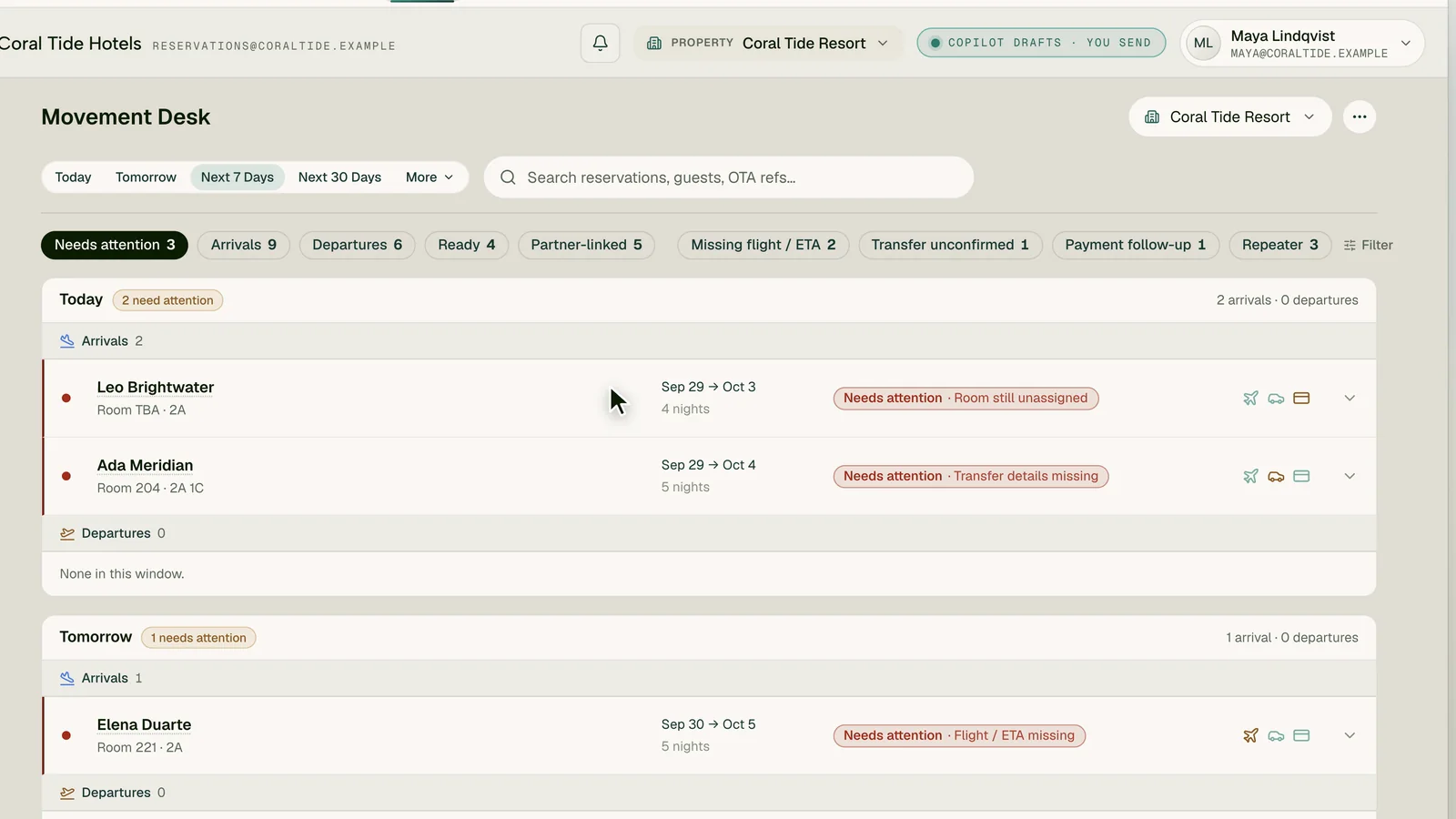
Movement Desk shows every arrival, departure and in-house stay with exactly what is missing: a flight, a transfer, a room, a payment. Fields your PMS already holds are filled in from it, and a disagreement is flagged instead of overwritten.
- “Needs attention” first: missing transfers, rooms, payments
- PMS values pre-filled, with a one-click fix for mismatches
- Payment follow-ups computed from your own policies
- A Today page that puts the shift's work in order
In the suite
Desk as it runs today.
A faithful recreation of the screen your team opens, shown with fictional data. Same context, same data and the same Nexus as every other surface.
How it works
From first signal
to a settled outcome.
Every Desk workflow starts from something real in the property, and every step keeps a person in charge of what reaches a guest, the books or the PMS.
- 01
Read
The email lands, is triaged and routed to the right property. Noise is kept out of the queue.
- 02
Draft
Copilot drafts the reply with live availability, your rate card and your knowledge base, and shows its sources.
- 03
Decide
Your team edits and sends. Autopilot, if you switch it on, sends only routine answers within the confidence and topics you set.
- 04
Book
When the guest accepts a quote your team sent, PMS Autopilot books it in your PMS and drafts the confirmation, where you switch it on. Transfer and arrival notes travel to the front desk in Flow.
Scope agreed in writing
Know what you are signing up for.
Confirm features, integration scope and support in your order form before relying on them for operations.
Subject to assessment
Plan your
connected workflows.
Availability is confirmed in writing for your property. Provider permissions, technical validation and any required approvals must be in place before activation. A request does not guarantee delivery.
- Property management
- Guest inbox
- Messaging
What changes
The same property,
on a calmer shift.
The 11 pm quote, ready by morning
Priced, checked against live availability and waiting for one click when the team walks in.
Noise out, guests first
OTA notices, payout statements and supplier pitches stop burying the guests who are waiting on you.
You decide how much AI does
Off, Copilot or Autopilot for replies, and for your PMS. Replies about bookings, complaints, cancellations and payments always wait for a person.
Bring Desk into the operating layer
Your inbox, finally on your side.
Keep your mailbox and your PMS. Add the layer that reads, sorts and drafts, so your team spends its time on the guests, not the inbox.